

Frontend architecture, navigation, state management, and design system diagrams map out the client-side experience.
Below is an exhaustive guide explaining each frontend diagram along with visual examples and specific use cases.
Part 1: Component Architecture & Structure (Arquitetura e Estrutura de Componentes)
1. Component Tree Diagram (Diagrama de Árvore de Componentes)

- Explanation: A hierarchical layout illustrating how UI building blocks (such as React, Vue, or Angular components) nest within one another, flowing from a parent root down to children and leaf nodes.
- Use Case: Planning component reusability, visualizing prop drilling paths, and auditing rendering performance hierarchies.
2. Component State & Lifecycle Diagram (Diagrama de Estado e Ciclo de Vida do Componente)
- Explanation: Details the various phases a component undergoes from birth (mounting), updates (re-rendering), to destruction (unmounting), along with hooks or event triggers.
- Use Case: Managing side effects, preventing memory leaks, and executing asynchronous data fetching at optimal lifecycle hooks.
3. C4 Model – Component/Code View for Frontend (C4 Model – Visão de Componentes)
- Explanation: Maps out the client-side containers (Single Page Application, browser storage) and internal software components (services, stores, routers).
- Use Case: Communicating frontend system boundaries and modularization strategies to software architects and teams.
4. Component Diagram – UML (Diagrama de Componentes)
- Explanation: Standard UML notation showing how independent frontend modules, libraries, and plug-ins interface with each other.
- Use Case: Defining boundaries between core application modules and third-party UI component packages.
Part 2: Navigation & User Flow (Navegação e Fluxo do Usuário)
1. User Flow / Screen Flow Diagram (Diagrama de Fluxo de Telas)
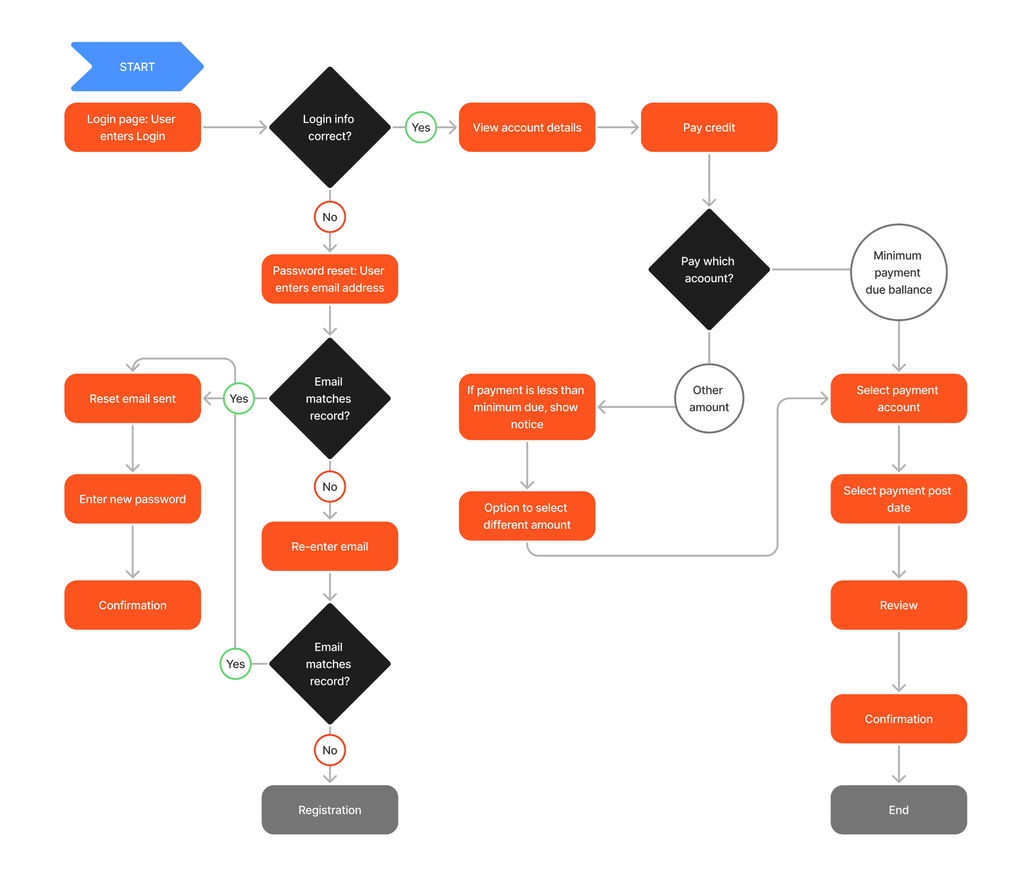
- Explanation: A flowchart mapping out the exact paths and decisions a user takes through various screens or views within a web or mobile application.
- Use Case: UX auditing, mapping onboarding processes, reducing friction in checkout funnels, and validating user journeys.
2. Information Architecture Diagram / Site Map (Diagrama de Arquitetura de Informação)
- Explanation: A hierarchical tree view showing the structural organization of pages, categories, and content sections across an entire web application.
- Use Case: Website redesigns, SEO planning, content management organization, and navigation menu structures.
3. Routing Diagram (Diagrama de Roteamento)
- Explanation: Maps URL endpoints (e.g.,
/dashboard/settings,/profile/:id) to specific screen components, including guards, redirects, and lazy-loading boundaries. - Use Case: Setting up Single Page Application (SPA) client-side routers, implementing authentication guards, and configuring deep linking.
Part 3: State Management & Reactivity (Gerenciamento de Estado e Reatividade)
1. State Flow Diagram – Redux / Zustand (Diagrama de Fluxo de Estado)
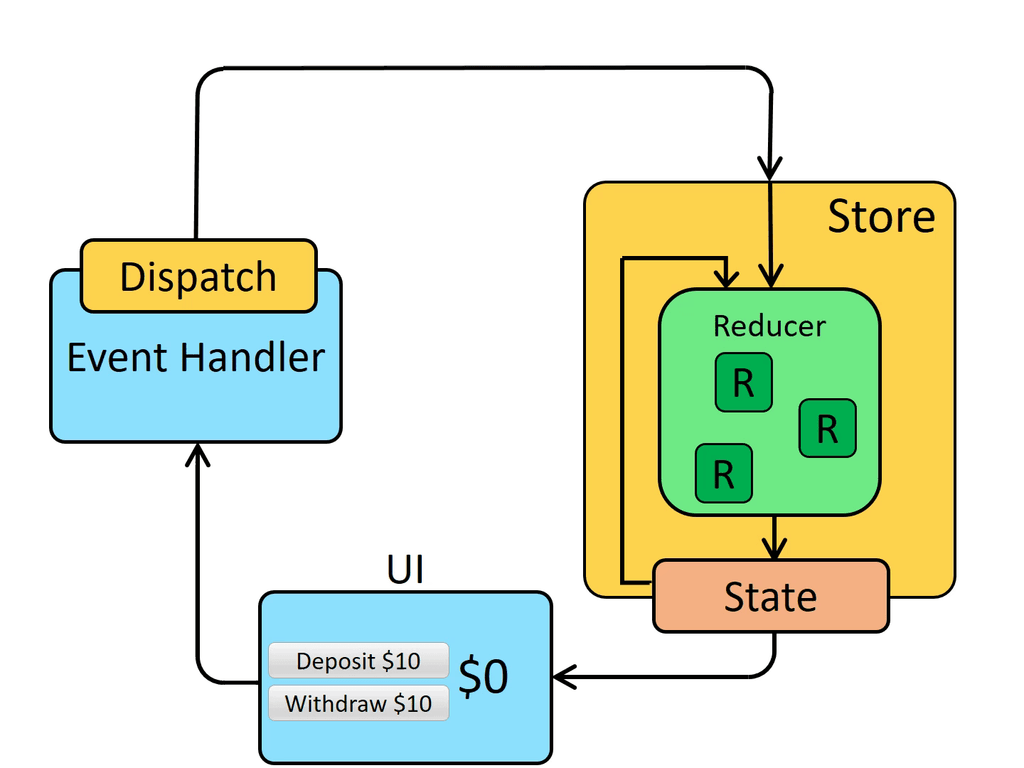
- Explanation: Illustrates the cyclic data flow in global state containers: User Action $\rightarrow$ Dispatch $\rightarrow$ Reducer/Store Update $\rightarrow$ Re-rendering UI.
- Use Case: Debugging complex global application states, coordinating multi-component data synchronization, and tracking action logs.
2. State Machine Diagram – UML (Diagrama de Transição de Estados)
- Explanation: Models discrete states (e.g.,
Idle,Loading,Success,Error) for asynchronous UI widgets (like forms or media players) and the events triggering transitions. - Use Case: Eliminating impossible UI states, robust form validation management, and complex multi-step wizards.
3. Unidirectional Data Flow Diagram (Diagrama de Fluxo Unidirecional de Dados)
- Explanation: Demonstrates the strict top-down rule where data flows downward from parent components via props, and upward only via emitted callbacks/events.
- Use Case: Maintaining predictable state updates, simplifying debugging, and avoiding side-effect bugs in reactive UI frameworks.
Part 4: Design System & Layout (Design System e Layout)
1. Atomic Design Map (Diagrama de Design System / Atomização UI)
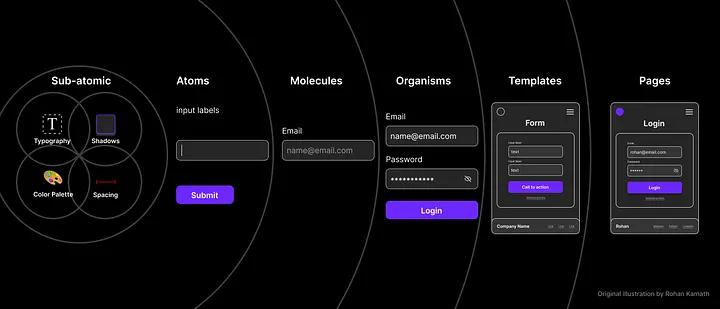
- Explanation: Breaks down UI elements hierarchically into Atoms (buttons, inputs), Molecules (search bars), Organisms (navbars), Templates, and Pages.
- Use Case: Building scalable design systems in Figma and code, creating Storybook component libraries, and ensuring UI consistency.
2. Wireframes & Layout Breakdown Diagrams (Diagrama de Estrutura de Layout)
- Explanation: Structural wireframe schematics illustrating the spatial arrangement of headers, sidebars, content grids, and footers.
- Use Case: Low-fidelity prototyping, communicating layout skeletons to stakeholders before styling, and responsive spacing planning.
3. Grid and Responsiveness Diagram (Diagrama de Grid e Responsividade)
- Explanation: Visualizes column layouts, gutters, breakpoints (mobile, tablet, desktop), and CSS Flexbox/Grid alignment rules.
- Use Case: Designing multi-device responsive web apps, implementing CSS Grid systems, and ensuring fluid typography and scaling.