

Unified Modeling Language (UML) is a standardized general-purpose modeling language in the field of software engineering. UML diagrams are divided into two main categories: Structural Diagrams (representing the static aspect of the system) and Behavioral Diagrams (representing the dynamic aspect of the system).
Below is a complete guide to all structural and behavioral UML diagrams, complete with explanations, examples, and use cases.
Part 1: Structural Diagrams (Diagramas Estruturais)
Structural diagrams depict the static structure of a system, focusing on the components, objects, classes, and physical nodes.
1. Class Diagram (Diagrama de Classes)
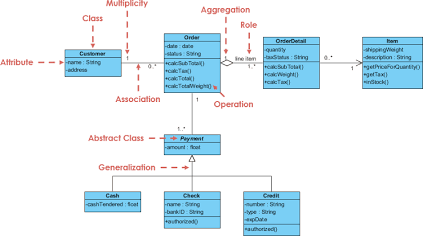
- Explanation: The most common diagram in UML. It describes the structure of a system by showing classes, their attributes, operations, and the relationships among objects (such as inheritance, association, and aggregation).
- Use Case: Used during the design phase to map out database schemas, object-oriented domain models, and application architecture.
2. Object Diagram (Diagrama de Objetos)
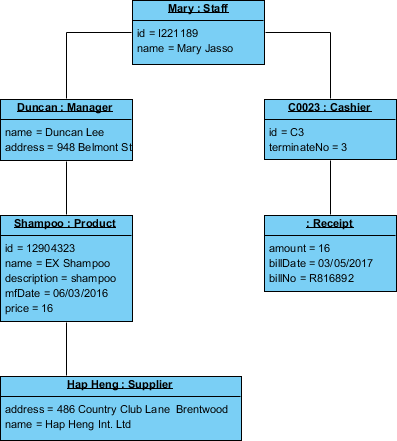
- Explanation: Shows a complete or partial view of the structure of a modeled system at a specific point in time. It uses concrete instances of classes (objects) and real values to demonstrate how the system looks during execution.
- Use Case: Validating class diagram structures with concrete examples, testing complex data structures, and debugging runtime states.
3. Component Diagram (Diagrama de Componentes)
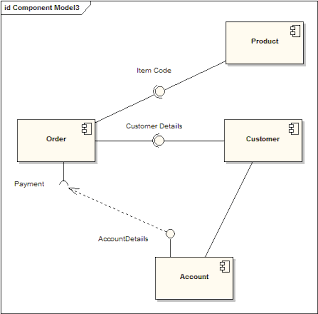
- Explanation: Illustrates the pieces of software, embedded controllers, or database tables, and how they wire together through interfaces. It breaks down a large system into smaller modular parts.
- Use Case: Designing modular service-oriented architectures, microservices, and tracking software dependencies between distinct modules.
4. Deployment Diagram (Diagrama de Implantação)
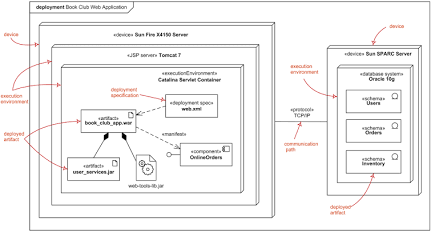
- Explanation: Shows the physical hardware nodes of a system (servers, devices) and the execution environments, along with the software artifacts deployed on them.
- Use Case: Planning physical infrastructure setup, cloud deployments, hardware topology, and network distributions.
5. Package Diagram (Diagrama de Pacotes)
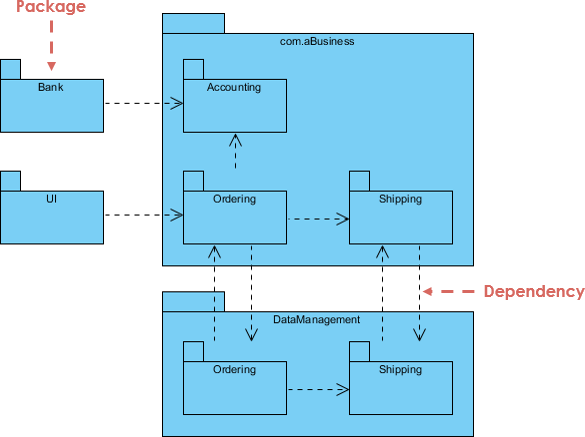
- Explanation: Used to organize large UML models into logical groupings and show the dependencies between these packages.
- Use Case: Managing large codebases, structuring namespace hierarchies, and separating architectural layers (e.g., UI, Business Logic, Data Access).
6. Composite Structure Diagram (Diagrama de Estrutura Composta)
- Explanation: Shows the internal structure of a classifier (such as a class, component, or node), including its parts, ports, and connectors.
- Use Case: Modeling complex collaborations, internal behaviors of encapsulated components, and nested runtime connectors.
7. Profile Diagram (Diagrama de Perfil)
- Explanation: Allows users to define custom stereotypes, tag definitions, and constraints to extend UML for specific domains (like real-time systems, business process modeling, or secure software).
- Use Case: Customizing UML elements for specialized frameworks or domain-specific language (DSL) extensions.
Part 2: Behavioral Diagrams (Diagramas Comportamentais)
Behavioral diagrams capture how the system changes over time, detailing interactions, workflows, states, and responses to events.
1. Use Case Diagram (Diagrama de Casos de Uso)
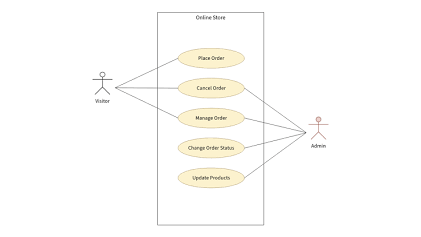
- Explanation: Represents the functionality of a system from an external user’s perspective. It highlights actors (users, external systems) and use cases (actions/features).
- Use Case: Requirements gathering, communicating system scope to stakeholders, and defining functional requirements.
2. Activity Diagram (Diagrama de Atividades)
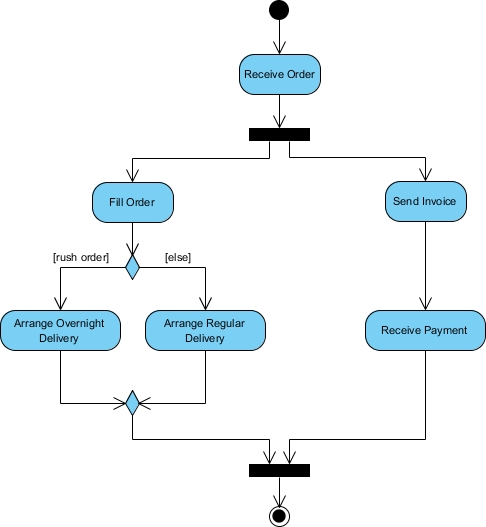
- Explanation: Represents business and operational workflows step-by-step using control flows, decision nodes, parallel branches (fork/join), and swimlanes.
- Use Case: Modeling business processes, algorithm logic, and complex sequential or parallel workflows.
3. State Machine Diagram (Diagrama de Transição de Estados)
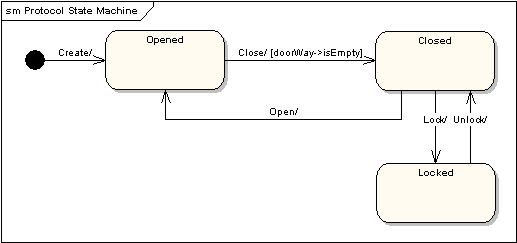
- Explanation: Shows the various states that an object or system can be in, the events that trigger transitions between states, and the actions resulting from those transitions.
- Use Case: Modeling the lifecycle of entities like orders, shopping carts, hardware devices, or user session states.
4. Sequence Diagram (Diagrama de Sequência)
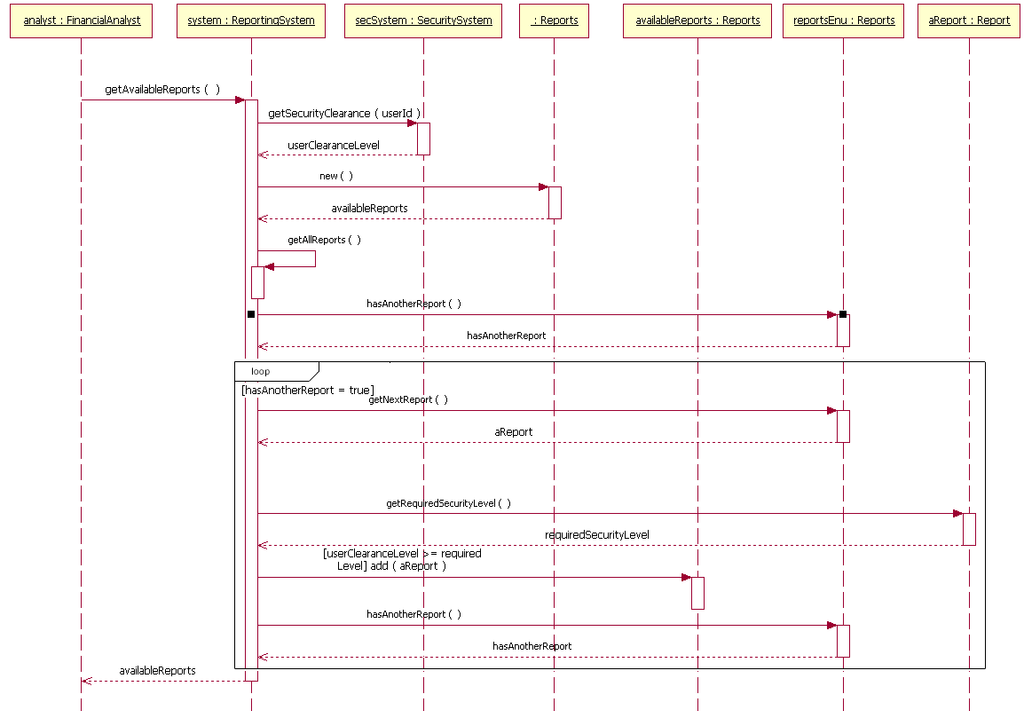
- Explanation: Focuses on the chronological sequence of message exchanges between objects or lifelines over time.
- Use Case: Detailed technical design of API calls, method invocations, and tracing how different components collaborate to fulfill a specific user request.
5. Communication Diagram (Diagrama de Comunicação)
- Explanation: Formerly known as a Collaboration diagram, it emphasizes the structural organization of objects and their interconnected message links using numbered paths (instead of chronological vertical lifelines).
- Use Case: Visualizing structural object interactions and local architectural links during runtime message passing.
6. Interaction Overview Diagram (Diagrama de Visão Geral da Interação)
- Explanation: A hybrid between activity diagrams and sequence diagrams, providing a high-level overview of control flows where the nodes are smaller interaction diagrams.
- Use Case: Coordinating complex system interactions across multiple alternate scenarios or high-level use case flows.
7. Timing Diagram (Diagrama de Tempo)
- Explanation: Focuses on time constraints and how objects change state or interact along a linear timeline axis.
- Use Case: Real-time embedded systems, hardware controllers, and applications where precise timing constraints and latency are critical.